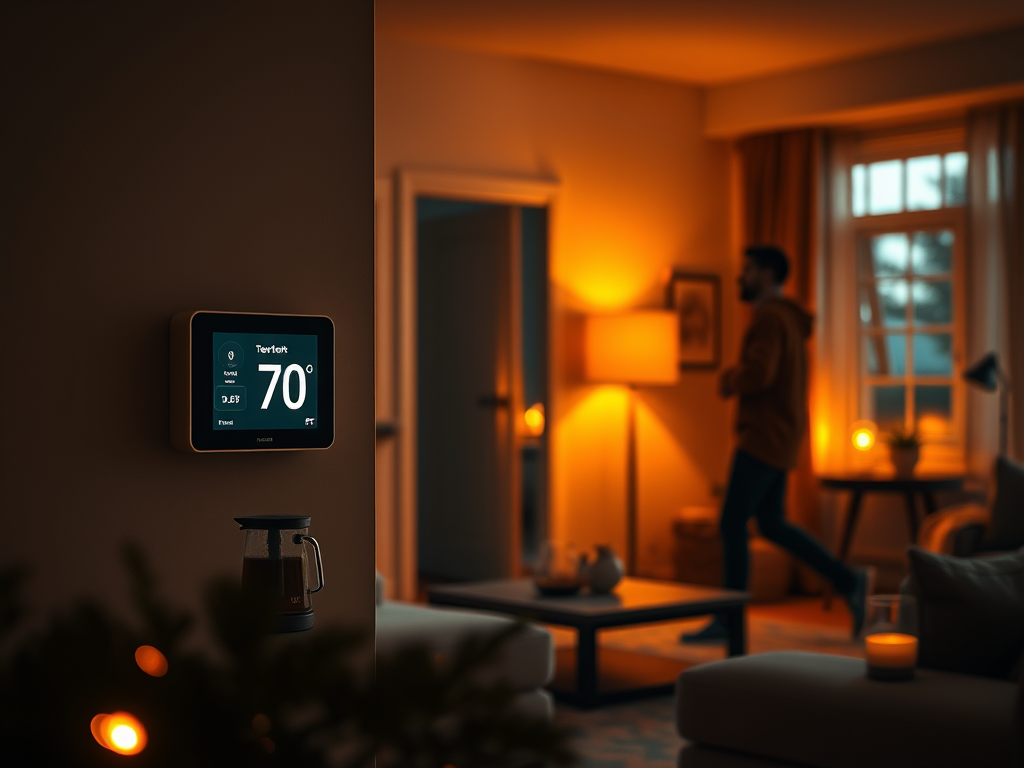
Imagine this: You wake up not to a blaring alarm, but to your lights gradually brightening, mimicking the sunrise. The thermostat has already warmed the house to a comfortable 70°F, and the scent of freshly brewed coffee drifts from the kitchen. As you walk through the house, the lights you need turn on before you and switch off behind you. This isn’t a scene from a futuristic movie; it’s a glimpse into a life where mundane tasks are simply… handled. My goal has always been to engineer this exact reality—a living space that actively works for me. It’s a delightful paradox where the desire to avoid repetitive chores—what some might call laziness—becomes the driving force for technical creativity and ultimate productivity.
The core philosophy is to transform my home from a collection of passive objects into a proactive, intelligent ecosystem. It should anticipate my needs, optimize for comfort, save money, and, most importantly, free up my time and mental energy for things that truly matter. It’s about offloading the small, daily cognitive load of “Did I turn off the lights? Did I close the garage? Is the temperature set correctly? Did I remember to open the windows before turning on the whole house fan?” so I can live with less frustration and more carefreely.
The “Why”: More Than Just Convenience
Before diving into the nuts and bolts, it’s important to understand the guiding principles behind my automations. They fall into three main categories:
Efficiency and Cost Savings: Every kilowatt-hour saved is a win for both my wallet and the environment. Automation isn’t about extravagance; it’s about precision. It means using energy only when and where it’s needed, whether it’s dimming lights that don’t need to be at full brightness or leveraging the cool night air instead of firing up the power-hungry air conditioner.
Comfort and Ambiance: A truly smart home feels right. It’s about creating the perfect environment for any activity. This means lights that transition to a warmer, dimmer setting in the evening to help wind down, or music that follows you from room to room. It’s the subtle art of making a space feel inviting and responsive.
Security and Peace of Mind: True security is more than an alarm. It’s the quiet confidence of knowing your home is secure. It’s getting a notification if a door is left open, being able to grant temporary access to a guest remotely, and having your home simulate occupancy when you’re thousands of miles away.
Custom Solutions for a Bespoke Home 🧑💻
While you can buy many smart devices off the shelf, the most powerful and satisfying automations come from custom-built solutions. For this, I turn to ESPHome, a transformative system for programming ESP32 microcontrollers that natively interacts with Home Assistant. It allows me to build hyper-specific, deeply integrated, and incredibly reliable devices that serve as the specialized organs of my smart home’s body. The ESPHome platform gives you the power to write low level code to an ESP32 microcontroller while handling the complex interactions needed to securely control those devices remotely.
Here are a few of my favorite custom-built ESPHome projects:
1. The Intelligent Garage Door Opener
The garage door is often the largest and most-used entrance to a home, yet its standard opener is remarkably dumb. My ESPHome-based controller, built with a simple microcontroller and a reed switch sensor, elevates it to a key component of my home’s intelligence.
Deep State Awareness: The system doesn’t just send a command; it knows the door’s actual state. Is it open, closed, or in motion? This allows for powerful, context-aware automations. For instance, if the door is left open for more than ten minutes after sunset, I receive a critical alert on my phone.
Presence-Based Automation: The system is integrated with our phones’ location data. When the last person leaves the defined “home” geofence, it automatically checks the garage door’s status and closes it if it was left open. The reverse is true as well—as I approach home, the door can open automatically. No more fumbling for a remote.
2. The Cost-Saving Whole House Fan Controller
Here in Southern California, our climate gifts us with hot, sunny days followed by cool, breezy evenings. A whole house fan is the perfect tool to exploit this pattern, but it requires perfect timing. My custom controller removes the guesswork and turns the fan into a smart, energy-saving powerhouse.
Multi-Factor Decision Making: This automation is more than a simple temperature comparison. It pulls in data from multiple sources. The logic is as follows: IF the outside temperature is at least 3 degrees cooler than the inside temperature, AND Zigbee sensors confirm at least two windows are open THEN the fan will turn on. The system ensures that the HVAC system is turned off if the above conditions are met.
Dynamic Speed Control: It doesn’t just flip on and off. The fan speed is modulated based on the temperature differential (the “delta-T”). A large difference triggers a high-speed purge, while a smaller one will run the fan at a lower, quieter speed to maintain comfort and reduce noise. This is a level of nuance impossible with a manual switch, and it has drastically cut our A/C usage during the summer, spring and fall months.
3. The Self-Sustaining Hydroponic Garden 🌱
The dream of farm-to-table freshness is appealing, but the reality of daily gardening can be demanding. My automated hydroponic system, powered by another ESPHome device, handles the tedious work, ensuring my plants thrive with minimal intervention.
Closed-Loop Feedback System: This isn’t just a timed sprinkler. The system uses a suite of scientific sensors to constantly monitor the growing environment. A float sensor maintains the perfect water level in the reservoir. Peristaltic pumps precisely dose nutrients based on real-time readings from an Electrical Conductivity (EC) sensor, ensuring optimal plant food levels. Another sensor monitors pH, and the pumps add micro-doses of pH up/down solution to keep the water in the perfect range for nutrient absorption. A timer maintains the perfect flow of water and nutrients to the plants.
More Than a Gadget: This project is about sustainability. Hydroponics uses up to 90% less water than traditional soil gardening, and by growing my own greens and herbs, I reduce food miles and packaging waste. It’s a small, personal victory for a healthier lifestyle and a healthier planet.
Tying It All Together: The Symphony of Integration
These custom ESPHome devices are the soloists, but they play in a larger orchestra. A truly smart home relies on a seamless integration of different technologies and protocols, all managed by a central “brain”—in my case, Home Assistant. This central hub is where the magic happens, orchestrating communication between all my devices.
The Zigbee network acts as the home’s sensory nervous system. These low-power mesh devices are perfect for battery-operated sensors on windows, doors, and motion detectors. They provide the crucial data points—the “eyes and ears”—that trigger my automations. A Zigbee motion sensor in the hallway doesn’t just turn on the lights; it triggers a scene that turns the Z-Wave light switch on to 10% brightness after midnight for gentle navigation, but to 80% during the evening.
The Z-Wave and WiFI network provides the muscle. Known for its reliability and range, I use it for critical infrastructure like door locks and light switches. It’s the robust backbone that executes commands flawlessly. When my Z-Wave front door lock is unlocked with my personal code, it triggers a “Welcome Home” scene: the security system disarms, the thermostat adjusts to my preferred setting.
The Journey Continues
Building an automated home is not a destination; it’s an ongoing journey of refinement and creativity. Each solved inefficiency opens my eyes to a new possibility. What’s next? Perhaps automated blinds that adjust based on the sun’s position to optimize for natural light and heat gain, or a smart water-leak detection system.
This fusion of DIY electronics with robust commercial products is where the real power lies. It’s proof that a little bit of “laziness,” when channeled through technology and a desire to improve one’s environment, can be the most productive force of all. It’s about building a home that doesn’t just shelter you but actively enriches your life.
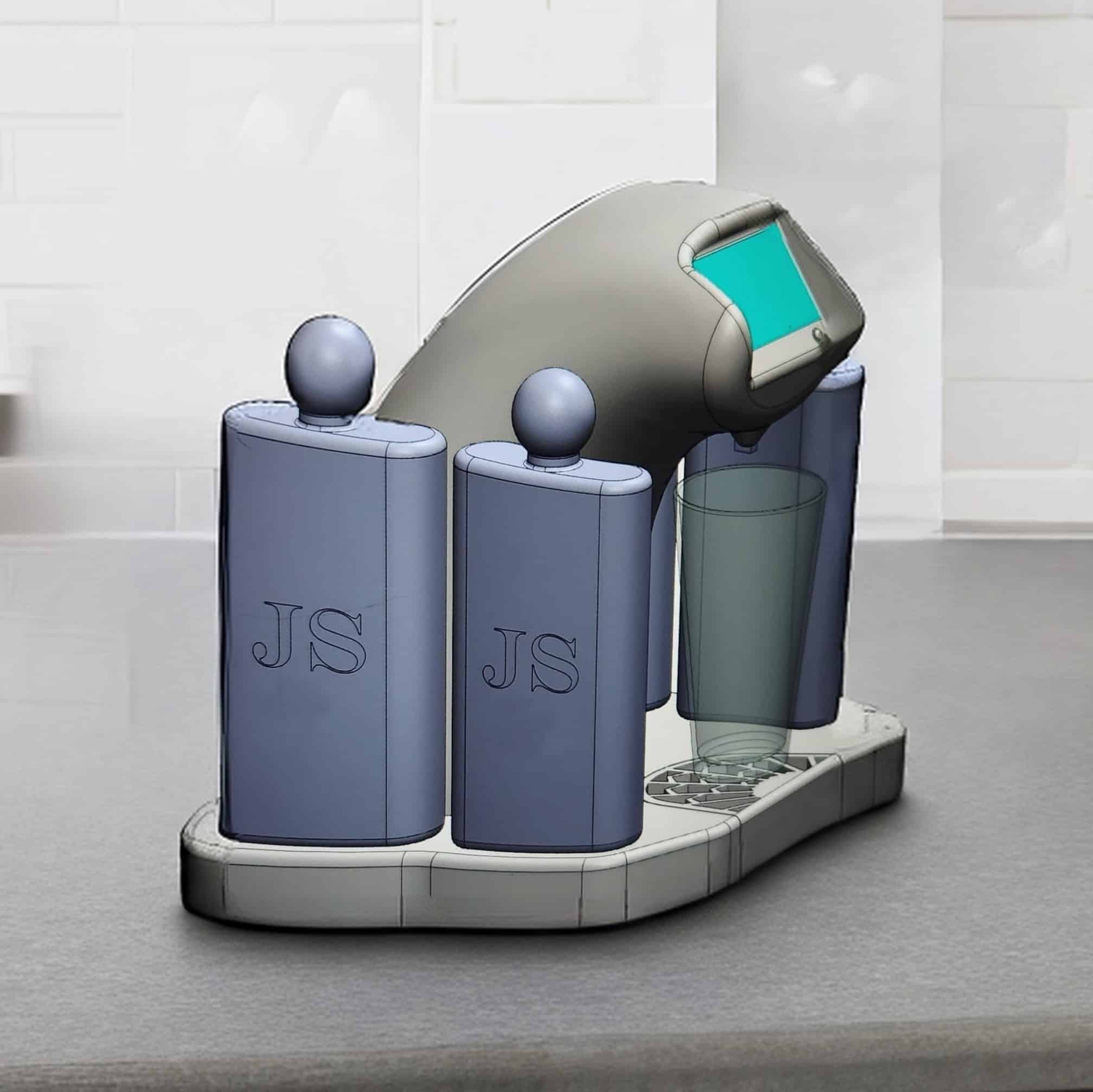
Every great project starts with a simple idea. For me, it was about blending classic mixology with interactive technology. I wanted to create more than just a drink dispenser; I wanted to create an experience. The result was Bar BEE Tender, a smart robotic bartender that crafts the perfect Old Fashioned, but only after you prove your worth in a classic game of “Simon.”
The concept was simple: the better you play, the more you get. As the evening progresses and more drinks are poured, the game’s memory sequence gets longer, adding a fun, challenging twist to a social gathering. It was an idea born from a desire to make technology fun, engaging, and a true centerpiece for connection.
The Concept: A Gamified Mixology Experience
Bar BEE Tender is an automated cocktail machine designed to pour a perfect Old Fashioned. The user interacts with a sleek touchscreen interface to start a game of “Simon.” Upon successfully completing the sequence, the machine precisely dispenses the ingredients—whiskey, bitters, and sugar—directly into your glass. With each drink poured, the challenge intensifies as the sequence length increases.
Core Features:
Gamified Dispensing: A “Simon” memory game that increases in difficulty.
Precision Mixology: Utilizes precise pumps and measurements for a consistently perfect Old Fashioned every time.
Smart Connectivity: Wi-Fi enabled for IoT integration, including voice commands via Amazon Alexa.
Mobile Management: A companion Android app for controlling the device, tracking usage, and managing settings.
The Technology Stack: Bringing Bar BEE Tender to Life
This project was a deep dive into full-stack product development. I personally designed, built, and coded every component, from the physical hardware to the cloud-based services.
Hardware: The heart of Bar BEE Tender is a custom-designed system built around a ESP32 microcontroller that controls a series of peristaltic pumps for accurate liquid dispensing. THe ESP32 was selected for the balance between cost and functions, including embedded WiFI, Bluetooth and its multithreading capabilities. The user interface is a responsive touchscreen display, all housed in a prototype chassis designed for both functionality and aesthetic appeal.
Hardware Block Diagram of Prototype
Firmware & Software: The firmware was written to manage the hardware operations—reading touchscreen input, running the game logic, and controlling the motors and pumps with millisecond precision. The system’s software layer, mainly in the AWS cloud included:
Wi-Fi Connectivity: Allowing the device to connect to a local network.
Amazon Alexa Integration: I developed a custom Alexa Skill enabling users to start the machine with voice commands like, “Alexa, ask Bar BEE Tender to make me a drink.”
Android Application: A prototype mobile app was created to remotely control the device, monitor ingredient levels, and customize drink recipes.
Firmware: The Brains of the Operation
The heart of the Bar BEE Tender’s intelligence lies in its firmware. Written in Arduino (C++), this code is the bridge between the physical hardware and the user experience. Running directly on the device’s microcontroller, the firmware is responsible for orchestrating every action, from the flashing lights of the “Simon” game to the precise activation of the pumps that pour the drink.
My approach was to build a robust, state-driven program that could reliably manage the machine’s different modes: waiting for a user (Idle), running the game (Gameplay), dispensing the cocktail (Pouring), cleaning and storage (Clean), and handling any potential issues (Error). This ensures the device operates smoothly and predictably.
Key Firmware Responsibilities:
Hardware Abstraction: Writing low-level drivers to control the touchscreen, addressable LEDs, audio buzzer, and the high-precision peristaltic pumps.
Game Logic: Implementing the core “Simon” game, including generating random sequences, capturing user input from the touchscreen, and validating the player’s memory. The difficulty (sequence length) was programmed to increase incrementally with each drink served.
Precision Pouring: Calibrating and controlling the pump motors with exact timing to dispense the precise volume of each ingredient—the key to a perfect Old Fashioned, every time.
State Management: A finite state machine (FSM) ensures the device is always in a known state, preventing conflicts like trying to pour a drink while a game is in progress.
Communication with AWS IOT: Syncing of local state and remote state using the AWS IOT framework.
Below is the full firmware.
/*
Copyright (C) 2023 Jeffrey Sawyer - All Rights Reserved
Project: Bar BEE Tender Firmware
Created by: Jeff Sawyer on 6/30/23
*/
#include "secrets.h"
#include <WiFiClientSecure.h>
#include <PubSubClient.h>
#include <ArduinoJson.h>
#include "WiFi.h"
const byte dwinrxPin = 16; //rx2
const byte dwintxPin = 17; //tx2
HardwareSerial dwin(1);
#include <Arduino.h>
#include <Wire.h>
#include <PCF8575.h> //https://github.com/xreef/PCF8575_library
#include <EEPROM.h>
#define EEPROM_SIZE 1028
#define GPIO1_Addr 0x20
PCF8575 pcf8575_1(GPIO1_Addr);
#define STATE_INIT 0
#define STATE_OLDFASHIONED 1
#define STATE_BOURBONSHOT 2
#define STATE_VODKASHOT 3
#define STATE_SETUP 4
#define STATE_MAX 4
// the main switch
#define rtsw 5
// define the pins that will be used for the pumps
#define pump1_p P0
#define pump1_n P1
#define pump2_p P2
#define pump2_n P3
#define pump3_p P4
#define pump3_n P5
#define pump4_p P6
#define pump4_n P7
#define debug_pin 16
#define DRINKS_COUNTER_ADDRESS 0
TaskHandle_t Task1;
boolean TurnDetected;
boolean up;
boolean insleep = 0;
boolean triggersleep = 0;
boolean entersleep = 0;
boolean exitsleep = 0;
boolean aborttask = 0;
bool use_lcd = 0;
bool SS_enabled = 1;
// Assign pins for buttons, leds and buzzer for simon
const int buttonPins[] = { P9, P11, P13, P15 };
const int ledPins[] = { P8, P10, P12, P14 };
const int buzzer = 26; // TODO this needs to be assigned to the correct pin
// These are the tones used for the buzzer using Hertz (Hz).
const int tones[] = { 1900, 1600, 1300, 1000, 3200 };
const int clean_steps = 5;
const int clean_time = 10;
const int soak_time = 50;
const int purge_time = 10;
const int prime_time = 1;
int wifi_timeout = 10;
boolean wifi_found = 0;
int wifi_networkid = 1;
char* wifi_hostname = "BarBeeTender";
char* wifi_ssid0 = "cackandballs";
char* wifi_password0 = "*********";
char* wifi_ssid1 = "Anteater";
char* wifi_password1 = "*********";
char* wifi_ssid2 = "pabsthouse";
char* wifi_password2 = ""*********";
char* wifi_ssid = wifi_ssid0;
char* wifi_password = wifi_password0;
// SS veriables
int buttonState[] = { 0, 0, 0, 0 }; // Current state of button.
int lastButtonState[] = { 0, 0, 0, 0 }; // Previous state of button.
int buttonCounter[] = { 0, 0, 0, 0 }; // This array holds 4 values - 1 (pressed) / 0 (not pressed).
int gameOn = 0; // A new game or level starts when gameOn is 0.
int wait = 0; // This is used to tell the game to wait until the player inputs a pattern.
const int n_levels = 100; // Length of series per level and number of levels until game is won.
int currentLevel = 1; // Current game level and length of sequence to make it to the next level.
int dlay = 500; // This is the amount of time to wait for the next button press (0.5 seconds).
int ledTime = 500; // Delay time of each LED flash when the correct button is pressed (0.5s).
int pinAndTone = 0; // Variable used to determine which LED to turn on and its buzzer tone.
int correct = 0; // This value must become 1 to go to the next level.
int speedFactor = 5; // This is the speed of the game. It increases every time a level is beaten.
int ledDelay = 200; // Delay before next LED lights up (0.2s). Decreases when level is completed.
int SS_level = 0;
int SS_unlocked = 0;
char temp_status_message[50];
int n_array[n_levels]; // n_array will store the randomized game pattern.
int u_array[n_levels]; // u_array will store the pattern input by the player.
int connectedfl = 0;
int trigger_pour = 0;
int trigger_pour_source = 0;
String drinktype = "";
int pouring = 0;
int cleaning = 0;
int purging = 0;
int priming = 0;
char AWS_PUBLISH_TOPIC[] = "$aws/things/" THINGNAME "/shadow/update";
char AWS_GET_TOPIC[] = "$aws/things/" THINGNAME "/shadow/get";
char* AWS_SUBSCRIBE_TOPIC[5] = {
"$aws/things/" THINGNAME "/shadow/get/accepted",
"$aws/things/" THINGNAME "/shadow/get/rejected",
"$aws/things/" THINGNAME "/shadow/update/accepted",
"$aws/things/" THINGNAME "/shadow/update/rejected",
"$aws/things/" THINGNAME "/shadow/update/delta"
};
char publishPayload[MQTT_MAX_PACKET_SIZE];
// interrupt handler for the turn detection of the rotary input device
void isr1() {
if (pouring || cleaning || purging || priming) { // if (pouring || cleaning) {
aborttask = 1;
} else {
//log_d("button pressed STATE_INIT insleep=%d, entersleep=%d, exitsleep=%d", insleep, entersleep, exitsleep);
if (insleep == 0) {
//log_d("Enter sleep");
triggersleep = 1;
entersleep = 1;
} else {
//log_d("Exit sleep");
triggersleep = 0;
exitsleep = 1;
}
}
}
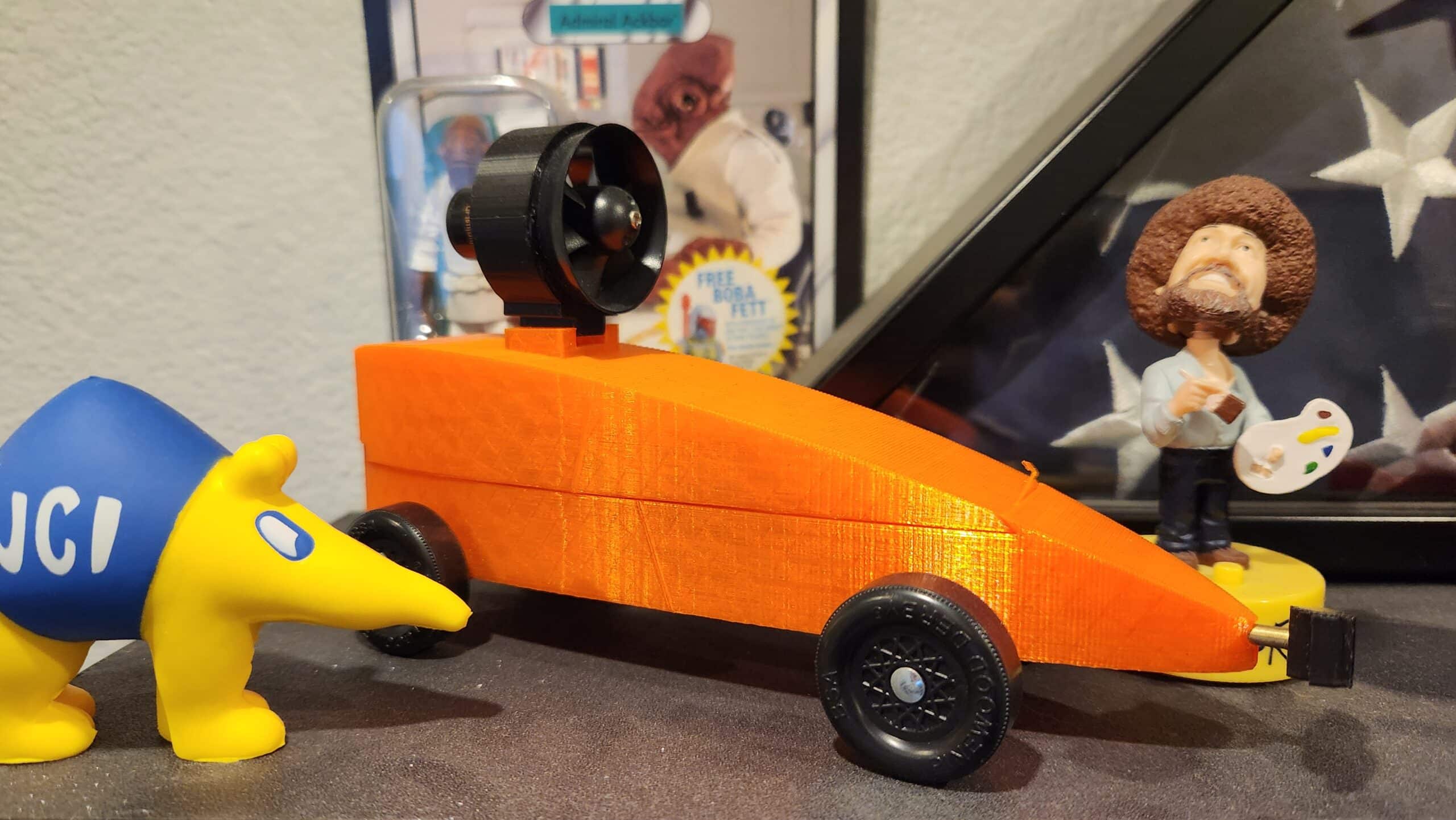
// return the number of drinks that have been made which is stored in the eeprom
byte get_lifetime_drinks() {
byte lifetime_drinks;
EEPROM.get(DRINKS_COUNTER_ADDRESS, lifetime_drinks);
set_touch_numdrinks(lifetime_drinks);
return lifetime_drinks;
}
// reset the number of drinks eeprom value
void reset_lifetime_drinks() {
EEPROM.write(DRINKS_COUNTER_ADDRESS, 0);
EEPROM.commit();
set_touch_numdrinks(0);
}
// increment the number ofr drinks counter and update the eeprom
void increment_drinks() {
byte lifetime_drinks;
EEPROM.get(DRINKS_COUNTER_ADDRESS, lifetime_drinks);
lifetime_drinks = lifetime_drinks + 1;
EEPROM.write(DRINKS_COUNTER_ADDRESS, lifetime_drinks);
EEPROM.commit();
set_touch_numdrinks(lifetime_drinks);
}
WiFiClientSecure net = WiFiClientSecure();
PubSubClient PSclient(net);
void getState() {
if (PSclient.publish(AWS_GET_TOPIC, "{}")) {
log_d("Getting Something from AWS_GET_TOPIC");
PSclient.loop();
} else {
log_d("Not Getting Something from AWS_GET_TOPIC");
};
}
void connectAWS() {
int wifi_trycounter = 0;
WiFi.mode(WIFI_STA);
WiFi.config(INADDR_NONE, INADDR_NONE, INADDR_NONE, INADDR_NONE);
WiFi.setHostname(wifi_hostname); //define hostname
wifi_found = (WiFi.status() == WL_CONNECTED);
while (!wifi_found) {
wifi_trycounter = 0;
connectedfl = 0;
WiFi.begin(wifi_ssid, wifi_password);
log_d("Connecting to Wi-Fi %s %s ", wifi_ssid, wifi_password);
while (WiFi.status() != WL_CONNECTED && wifi_trycounter < wifi_timeout) {
delay(500);
log_d(".");
wifi_trycounter++;
}
if (WiFi.status() == WL_CONNECTED) {
wifi_found = 1;
log_d("Connected to Wi-Fi %s %s ", wifi_ssid, wifi_password);
set_top_icon(0, 1);
} else {
wifi_found = 0;
set_top_icon(0, 0);
wifi_networkid++;
if (wifi_networkid > 2) {
wifi_networkid = 0;
}
if (wifi_networkid == 0) {
wifi_ssid = wifi_ssid0;
wifi_password = wifi_password0;
} else if (wifi_networkid == 1) {
wifi_ssid = wifi_ssid1;
wifi_password = wifi_password1;
} else {
wifi_ssid = wifi_ssid2;
wifi_password = wifi_password2;
}
log_d("Failed t find Wi-Fi, switching to %s %s wifi_networkid=%d", wifi_ssid, wifi_password, wifi_networkid);
}
}
// Configure WiFiClientSecure to use the AWS IoT device credentials
net.setCACert(AWS_CERT_CA);
net.setCertificate(AWS_CERT_CRT);
net.setPrivateKey(AWS_CERT_PRIVATE);
// Connect to the MQTT broker on the AWS endpoint we defined earlier
PSclient.setBufferSize(1024);
PSclient.setServer(AWS_IOT_ENDPOINT, 8883);
// Create a message handler
PSclient.setCallback(callback);
log_d("Connecting to AWS IOT");
while (!PSclient.connect(THINGNAME)) {
log_d(".");
delay(100);
}
if (!PSclient.connected()) {
log_d("AWS IoT Timeout!");
return;
}
// Subscribe to a topic
for (int i = 0; i < 5; i++) {
if (PSclient.subscribe(AWS_SUBSCRIBE_TOPIC[i])) {
log_d("Connected to %s\n", AWS_SUBSCRIBE_TOPIC[i]);
} else {
log_d("Not connected to %s\n", AWS_SUBSCRIBE_TOPIC[i]);
}
}
log_d("AWS IoT Connected!");
}
void updateIOTState(String istate_type, int itrigger_pour) {
const char* temp_drinktype = drinktype.c_str();
sprintf(publishPayload, "{\"state\":{\"%s\":{\"connectedfl\":%d,\"trigger_pour\":%d,\"drinktype\":\"%s\",\"pouring\":%d,\"cleaning\":%d,\"purging\":%d,\"priming\":%d,\"num_drinks\":%d,\"localip\":\"%s\",\"subnetmask\":\"%s\",\"wifi\":\"%s\"}}}",
istate_type, connectedfl, itrigger_pour, temp_drinktype, pouring, cleaning, purging, priming, get_lifetime_drinks(), String(WiFi.localIP()), WiFi.subnetMask().toString(), wifi_ssid);
PSclient.publish(AWS_PUBLISH_TOPIC, publishPayload);
log_d("Publish [%s] %s \ndrinktype:%s\n", AWS_PUBLISH_TOPIC, publishPayload, temp_drinktype);
}
void callback(char* topic, byte* payload, unsigned int length) {
//char buf[MQTT_MAX_PACKET_SIZE];
// Create a buffer for the incoming payload
char message[length + 1];
strncpy(message, (char*)payload, length);
message[length] = '\0';
printf("Message arrived [%s] %s\r\n", topic, message);
if ((strstr(topic, "/shadow/get/accepted") != NULL) || (strstr(topic, "/shadow/update/accepted") != NULL)) {
// Parse JSON
DynamicJsonDocument doc(1024);
DeserializationError error = deserializeJson(doc, message);
if (error) {
Serial.print("deserializeJson() failed: ");
Serial.println(error.f_str());
return;
}
// Extract values (modify according to your JSON structure)
//const char* state = doc["state"]["desired"]["yourPropertyName"];
//Serial.println(state);
JsonVariant exists_n = doc["state"]["desired"];
if (!exists_n.isNull()) {
// connectedfl = doc["state"]["desired"]["connectedfl"];
trigger_pour = doc["state"]["desired"]["trigger_pour"];
trigger_pour_source = 1;
const char* temp_drinktype = doc["state"]["desired"]["drinktype"];
//String temp_drinktype = sprintf("%s", obj["state"]["desired"]["drinktype"]);
// pouring = doc["state"]["desired"]["pouring"];
drinktype = String(temp_drinktype);
log_d("callback connectedfl=%d trigger_pour=%d drinktype=%s pouring=%d", connectedfl, trigger_pour, drinktype, pouring);
}
}
}
// this is the Simmon Says test routine, called when the user wants to make a drink and SS is enabled
void SS_test() {
// wait for unlock
int SS_unlocked = 0;
int i;
int fail_count = 0;
String locked_str = "";
if (SS_enabled && !trigger_pour_source) {
currentLevel = get_lifetime_drinks() + 1;
set_touch_page(52);
sprintf(temp_status_message, "Game Level: %d: Good Luck!.", currentLevel);
set_status_text(temp_status_message);
// play the game
while (SS_unlocked == 0) {
if (wait == 0) { // Triggers if no action is required from the player.
i = 0;
for (i = 0; i < currentLevel; i = i + 1) { // This ‘for’ loop cycles the current game pattern.
ledDelay = ledTime / (1 + (speedFactor / n_levels) * (currentLevel - 1));
pinAndTone = n_array[i];
//pcf8575_1.digitalWrite(ledPins[pinAndTone], HIGH);
set_game_light(pinAndTone, 1);
playTone(tones[pinAndTone], ledDelay);
//pcf8575_1.digitalWrite(ledPins[pinAndTone], LOW);
set_game_light(pinAndTone, 0);
delay(100);
log_d("Show user: %i : %i", i, pinAndTone);
}
wait = 1; // This puts the game on hold until the player enters a pattern.
}
set_touch_page(2);
i = 0;
int buttonChange = 0;
// buttonChange will be used to detect when a button is pressed.
int j = 0; // ‘j’ is the current position in the pattern.
while (j < currentLevel) {
while (buttonChange == 0) {
unsigned char button_value = get_button_press();
for (i = 0; i < 4; i = i + 1) { // This loop determines which button is pressed by the player.
// pcf8575_1.digitalWrite(buttonPins[i], HIGH);
buttonState[i] = bitRead(button_value, i);
buttonChange += buttonState[i];
if (buttonChange > 0) {
log_d("Buttons: buttonState[%i]=%i buttonChange=%i", i, buttonState[i], buttonChange);
}
}
delay(10); // this delay has to be here to allow for the read, should try and do the read in a single call
}
// This turns on the corresponding LED to the button pressed, and stores it in the array.
for (i = 0; i < 4; i = i + 1) {
if (buttonState[i] == 1) {
set_game_light(i, 1);
playTone(tones[i], ledTime); // Calls function playTone, plays corresponding tone on the buzzer.
set_game_light(i, 0);
wait = 0;
u_array[j] = i; // This stores the player’s input to be matched against the game pattern.
buttonState[i] = LOW;
buttonChange = 0; // This resets the button.
}
}
if (u_array[j] == n_array[j]) {
correct = 1;
log_d("Correct: %i", n_array[j]);
j++;
}
// This section checks if the button pressed by the player matches the game pattern.
else {
correct = 0;
i = 4;
j = currentLevel;
wait = 0;
log_d("Incorrect: expected: %i received %i", n_array[j], u_array[j]);
}
}
// If the player makes a mistake, these variables will be reset so that the game starts over.
if (correct == 0) {
set_touch_page(52);
fail_count = fail_count + 1;
if (fail_count > 1) {
int randomNumber = random(4);
switch (randomNumber) {
case 0:
sprintf(temp_status_message, "Game Level: %d: Loser you failed again.", currentLevel);
break;
case 1:
sprintf(temp_status_message, "Game Level: %d: Are you kidding me?", currentLevel);
break;
case 2:
sprintf(temp_status_message, "Game Level: %d: What a shit play", currentLevel);
break;
case 3:
sprintf(temp_status_message, "Game Level: %d: Did your mother drop you?", currentLevel);
break;
}
} else {
sprintf(temp_status_message, "Game Level: %d: You are a failure!", currentLevel);
}
set_status_text(temp_status_message);
delay(300);
i = 0;
gameOn = 0;
// this needs to be rewritten to write all the bits at the same time.
for (i = 0; i < 4; i = i + 1) {
set_game_light(i, 1);
}
playTone(tones[4], ledTime);
for (i = 0; i < 4; i = i + 1) {
set_game_light(i, 0);
}
delay(200);
for (i = 0; i < 4; i = i + 1) {
set_game_light(i, 1);
}
playTone(tones[4], ledTime);
// This "for loop" makes all of the LEDs blink twice and the buzzer beep twice when the player makes a mistake and loses the game.
for (i = 0; i < 4; i = i + 1) {
set_game_light(i, 0);
}
delay(500);
gameOn = 1;
SS_unlocked = 0;
log_d("failed, still locked");
for (i = 0; i < n_levels; i = i + 1) {
u_array[i] = 0;
}
}
if (correct == 1) { // If the player gets the sequence right, the game goes up one level.
wait = 0;
set_touch_page(52);
SS_unlocked = 1;
Serial.println("unlocked");
}
}
}
sprintf(temp_status_message, "");
set_status_text(temp_status_message);
}
// control the motors, either forward or reverse
void control_motor(int motor_num, int motor_direction) {
if (motor_direction == 1) { // forward
if (motor_num == 1) {
log_d("Motor 1 ON FORWARD");
pcf8575_1.digitalWrite(pump1_p, LOW);
pcf8575_1.digitalWrite(pump1_n, HIGH);
}
if (motor_num == 2) {
log_d("Motor 2 ON FORWARD");
pcf8575_1.digitalWrite(pump2_p, LOW);
pcf8575_1.digitalWrite(pump2_n, HIGH);
}
if (motor_num == 3) {
log_d("Motor 3 ON FORWARD");
pcf8575_1.digitalWrite(pump3_p, LOW);
pcf8575_1.digitalWrite(pump3_n, HIGH);
}
if (motor_num == 4) {
log_d("Motor 4 ON FORWARD");
pcf8575_1.digitalWrite(pump4_p, LOW);
pcf8575_1.digitalWrite(pump4_n, HIGH);
}
} else if (motor_direction == -1) {
if (motor_num == 1) {
log_d("Motor 1 ON REVERSE");
pcf8575_1.digitalWrite(pump1_p, HIGH);
pcf8575_1.digitalWrite(pump1_n, LOW);
}
if (motor_num == 2) {
log_d("Motor 2 ON REVERSE");
pcf8575_1.digitalWrite(pump2_p, HIGH);
pcf8575_1.digitalWrite(pump2_n, LOW);
}
if (motor_num == 3) {
log_d("Motor 3 ON REVERSE");
pcf8575_1.digitalWrite(pump3_p, HIGH);
pcf8575_1.digitalWrite(pump3_n, LOW);
}
if (motor_num == 4) {
log_d("Motor 4 ON REVERSE");
pcf8575_1.digitalWrite(pump4_p, HIGH);
pcf8575_1.digitalWrite(pump4_n, LOW);
}
} else {
if (motor_num == 1) {
log_d("Motor 1 OFF");
pcf8575_1.digitalWrite(pump1_p, LOW);
pcf8575_1.digitalWrite(pump1_n, LOW);
}
if (motor_num == 2) {
log_d("Motor 2 OFF");
pcf8575_1.digitalWrite(pump2_p, LOW);
pcf8575_1.digitalWrite(pump2_n, LOW);
}
if (motor_num == 3) {
log_d("Motor 3 OFF");
pcf8575_1.digitalWrite(pump3_p, LOW);
pcf8575_1.digitalWrite(pump3_n, LOW);
}
if (motor_num == 4) {
log_d("Motor 4 OFF");
pcf8575_1.digitalWrite(pump4_p, LOW);
pcf8575_1.digitalWrite(pump4_n, LOW);
}
}
}
void prime() {
log_i("Priming");
priming = 1;
set_touch_page(51);
updateIOTState("reported", 0);
sprintf(temp_status_message, "Prime");
set_status_text(temp_status_message);
control_motor(1, 1);
control_motor(2, 1);
control_motor(3, 1);
control_motor(4, 1);
for (int i = 0; i <= (prime_time * 10); i++) {
delay(100);
int percent_complete = int((float(i) / (prime_time * 10)) * 100);
set_touch_progress(percent_complete);
}
control_motor(1, 0);
control_motor(2, 0);
control_motor(3, 0);
control_motor(4, 0);
delay(100);
set_touch_progress(0);
priming = 0;
updateIOTState("reported", 0);
sprintf(temp_status_message, "");
set_status_text(temp_status_message);
set_touch_page(1);
}
void purge() {
log_i("Purging");
purging = 1;
set_touch_page(51);
updateIOTState("reported", 0);
sprintf(temp_status_message, "Purging");
set_status_text(temp_status_message);
control_motor(1, -1);
control_motor(2, -1);
control_motor(3, -1);
control_motor(4, -1);
for (int i = 0; i <= (purge_time * 10); i++) {
delay(100);
int percent_complete = int((float(i) / (purge_time * 10)) * 100);
set_touch_progress(percent_complete);
}
control_motor(1, 0);
control_motor(2, 0);
control_motor(3, 0);
control_motor(4, 0);
delay(100);
set_touch_progress(0);
purging = 0;
updateIOTState("reported", 0);
sprintf(temp_status_message, "");
set_status_text(temp_status_message);
set_touch_page(1);
}
void reset_counters() {
log_i("Resetting counters");
set_touch_page(51);
reset_lifetime_drinks();
delay(100);
set_touch_progress(0);
set_touch_page(1);
}
void clean() {
log_i("Cleaning");
delay(10);
cleaning = 1;
aborttask = 0;
updateIOTState("reported", 0);
int total_time = ((clean_time + soak_time) * clean_steps) + purge_time;
int completed_time = 0;
set_touch_page(51);
for (int s = 1; s <= clean_steps; s++) {
control_motor(1, 1);
control_motor(2, 1);
control_motor(3, 1);
control_motor(4, 1);
sprintf(temp_status_message, "Cleaning: Phase %d of %d Pump", s, clean_steps);
set_status_text(temp_status_message);
for (int i = 0; i <= clean_time; i++) {
int percent_complete = int((float(i + completed_time) / total_time) * 100);
set_touch_progress(percent_complete);
delay(1000);
if (aborttask) {
delay(500);
if (digitalRead(rtsw) == LOW) {
control_motor(1, 0);
control_motor(2, 0);
control_motor(3, 0);
control_motor(4, 0);
log_d("Abort Cleaning Pump");
set_touch_page(1);
delay(1000);
set_touch_progress(0);
cleaning = 0;
aborttask = 0;
updateIOTState("reported", 0);
return;
}
aborttask = 0;
}
}
control_motor(1, 0);
control_motor(2, 0);
control_motor(3, 0);
control_motor(4, 0);
sprintf(temp_status_message, "Cleaning: Phase %d of %d Soak", s, clean_steps);
set_status_text(temp_status_message);
for (int i = 0; i <= soak_time; i++) {
int percent_complete = int((float((i + clean_time) + completed_time) / total_time) * 100);
set_touch_progress(percent_complete);
delay(1000);
if (aborttask) {
delay(500);
if (digitalRead(rtsw) == LOW) {
control_motor(1, 0);
control_motor(2, 0);
control_motor(3, 0);
control_motor(4, 0);
log_d("Abort Cleaning Soak");
set_touch_page(1);
delay(1000);
set_touch_progress(0);
cleaning = 0;
aborttask = 0;
updateIOTState("reported", 0);
return;
}
aborttask = 0;
}
}
completed_time = completed_time + clean_time + soak_time;
}
control_motor(1, -1);
control_motor(2, -1);
control_motor(3, -1);
control_motor(4, -1);
sprintf(temp_status_message, "Cleaning: Purge");
set_status_text(temp_status_message);
for (int i = 0; i <= (purge_time); i++) {
delay(1000);
int percent_complete = int((float((i + purge_time) + completed_time) / total_time) * 100);
set_touch_progress(percent_complete);
}
control_motor(1, 0);
control_motor(2, 0);
control_motor(3, 0);
control_motor(4, 0);
delay(1000);
set_touch_progress(0);
set_touch_page(1);
cleaning = 0;
updateIOTState("reported", 0);
sprintf(temp_status_message, "");
set_status_text(temp_status_message);
}
// pour a drink
void pour(int m1_time, int m2_time, int m3_time, int m4_time) {
delay(10);
pouring = 1;
updateIOTState("reported", trigger_pour);
aborttask = 0;
if (m1_time > 0) {
control_motor(1, 1);
}
if (m2_time > 0) {
control_motor(2, 1);
}
if (m3_time > 0) {
control_motor(3, 1);
}
if (m4_time > 0) {
control_motor(4, 1);
}
int max_time = m1_time;
if (m2_time > max_time) {
max_time = m2_time;
}
if (m3_time > max_time) {
max_time = m3_time;
}
if (m4_time > max_time) {
max_time = m4_time;
}
increment_drinks();
log_d("max_time %i", max_time);
for (int i = 0; i <= max_time; i++) {
int percent_complete = int((float(i) / max_time) * 100);
int percent_complete_bar = int((float(i) / max_time) * 18);
String percent_complete_time_str = "";
percent_complete_time_str += String(i);
percent_complete_time_str += " of ";
percent_complete_time_str += String(max_time);
percent_complete_time_str += " seconds ";
String percent_complete_str = "";
percent_complete_str += String(percent_complete);
percent_complete_str += "% complete";
String percent_complete_bar_str = "8";
// percent_complete_str += String(percent_complete);
// percent_complete_str += "% complete ";
for (int i = 0; i < 17; i = i + 1) {
if (i < percent_complete_bar) {
percent_complete_bar_str += "=";
} else if (i == percent_complete_bar) {
percent_complete_bar_str += "D";
} else {
percent_complete_bar_str += " ";
}
}
percent_complete_bar_str += "O:";
log_d("Percent complete: %i", percent_complete);
set_touch_progress(percent_complete);
if (i == m1_time) {
control_motor(1, 0);
}
if (i == m2_time) {
control_motor(2, 0);
}
if (i == m3_time) {
control_motor(3, 0);
}
if (i == m4_time) {
control_motor(4, 0);
}
delay(1000);
if (aborttask) {
delay(500);
if (digitalRead(rtsw) == LOW) {
control_motor(1, 0);
control_motor(2, 0);
control_motor(3, 0);
control_motor(4, 0);
set_touch_page(10);
log_d("Abort Pouring");
delay(1000);
set_touch_progress(0);
pouring = 0;
aborttask = 0;
updateIOTState("reported", 0);
return;
}
aborttask = 0;
}
}
pouring = 0;
updateIOTState("reported", trigger_pour);
}
// play tones on the buzzer
void playTone(int tone, int duration) {
for (long i = 0; i < duration * 1000L; i += tone * 2) {
digitalWrite(buzzer, HIGH); // Turns the buzzer on.
delayMicroseconds(tone); // Creates the tone of the buzzer.
digitalWrite(buzzer, LOW); // Turns the buzzer off.
delayMicroseconds(tone);
}
}
void SS_init_game_pattern() {
int i;
for (i = 0; i < n_levels; i = i + 1) {
// Saves the number in n_array to generate a random pattern.
n_array[i] = 0;
u_array[i] = 0;
n_array[i] = random(0, 4);
log_d("n_arry[%i]=%i", i, n_array[i]);
}
}
// setup
void setup() {
// set the debug serial port baud rate
Serial.begin(115200);
dwin.begin(115200, SERIAL_8N1, dwinrxPin, dwintxPin);
// display debug information to the debug serial port
log_d("Total heap: %d", ESP.getHeapSize());
log_d("Free heap: %d", ESP.getFreeHeap());
log_d("Total PSRAM: %d", ESP.getPsramSize());
log_d("Free PSRAM: %d", ESP.getFreePsram());
log_d("Bar-BEE setup started");
// make sure the eeprom is working
if (!EEPROM.begin(EEPROM_SIZE)) {
log_d("EEPROM failed to initialize");
while (true)
;
} else {
log_d("EEPROM initialized");
}
// setup the rotary input interface
pinMode(rtsw, INPUT_PULLUP);
// set the the motor pins
pcf8575_1.pinMode(pump1_p, OUTPUT);
pcf8575_1.pinMode(pump1_n, OUTPUT);
pcf8575_1.pinMode(pump2_p, OUTPUT);
pcf8575_1.pinMode(pump2_n, OUTPUT);
pcf8575_1.pinMode(pump3_p, OUTPUT);
pcf8575_1.pinMode(pump3_n, OUTPUT);
pcf8575_1.pinMode(pump4_p, OUTPUT);
pcf8575_1.pinMode(pump4_n, OUTPUT);
// this is to set the random see for the SS game
randomSeed(analogRead(0)); // Used to generate random numbers.
// Initialize inputs.
reset_touch_screen();
for (int i = 0; i < 4; i = i + 1) {
pcf8575_1.pinMode(ledPins[i], OUTPUT);
pcf8575_1.pinMode(buttonPins[i], INPUT);
}
// connect to the external GPIO chip(s)
pcf8575_1.begin();
pinMode(buzzer, OUTPUT);
SS_init_game_pattern();
// go into a debug mode where the LCD screen is not working
// by holding the rotary inout switch down when the unit boots the
// lcd screen will be disabled and the led attached to the
// debug pin will be flashed
// wait for the wsitch to be relased before proceeding
if (digitalRead(rtsw) == LOW) {
use_lcd = 0;
log_d("Debug mode, turn off LCD");
digitalWrite(debug_pin, HIGH);
delay(500);
digitalWrite(debug_pin, LOW);
delay(500);
digitalWrite(debug_pin, HIGH);
delay(500);
digitalWrite(debug_pin, LOW);
delay(500);
while (digitalRead(rtsw) == LOW) {
delay(100);
}
}
// test is the external GPIO deviceis availible
// if not flash the debug pin and stall the
// program
int GPIO_found = 0;
while (!GPIO_found) {
Wire.beginTransmission(GPIO1_Addr);
log_d("Testing address for GPIO I2C chip");
int error = Wire.endTransmission();
if (error == 0) {
log_d("GPIO Found");
GPIO_found = 1;
} else {
log_d("GPIO Not found, retry");
GPIO_found = 0;
delay(1000);
}
}
// turn all the motors off
control_motor(1, 0);
control_motor(2, 0);
control_motor(3, 0);
control_motor(4, 0);
attachInterrupt(digitalPinToInterrupt(rtsw), isr1, FALLING);
TurnDetected = false;
// create a task that will be executed in the Task1code() function, with priority 1 and executed on core 0
xTaskCreatePinnedToCore(
Task1code, /* Task function. */
"Task1", /* name of task. */
10000, /* Stack size of task */
NULL, /* parameter of the task */
1, /* priority of the task */
&Task1, /* Task handle to keep track of created task */
0); /* pin task to core 0 */
delay(500);
log_d("Bar-BEE setup completed");
log_d("Night drinks made: %i", get_lifetime_drinks());
SS_enabled = 1;
if (SS_enabled) {
set_top_icon(1, 2);
} else {
set_top_icon(1, 3);
}
delay(1000);
set_touch_page(10);
}
// Task1code: Stay connected to AWS
void Task1code(void* pvParameters) {
Serial.print("Network running on core ");
Serial.println(xPortGetCoreID());
for (;;) {
if (!PSclient.connected()) {
connectAWS();
// getState();
}
PSclient.loop();
if (connectedfl == 0) {
connectedfl = 1;
//TODO this should not be hard coded, it should grab from the current vars, this could crash the running drink like this
updateIOTState("reported", 0);
}
delay(100);
}
}
// the main loop of the program
void loop() {
// always clear this flag
aborttask = 0;
// if the isr triggered sleep by the user pressing a button or we are in sleep
if (triggersleep || insleep) {
if (entersleep) {
// do stuff to enter sleep
log_d("Entering Sleep");
set_touch_page(00);
delay(1000);
entersleep = 0;
set_touch_page(99);
insleep = 1;
} else if (exitsleep) {
// do stuff on exit sleep
log_d("Exiting Sleep");
set_touch_page(00);
delay(1000);
set_touch_page(10);
exitsleep = 0;
insleep = 0;
} else {
// do nothing
}
} else {
// if not entering of exiting of in sleep then check if we need to pour a drink
// check if we have anything to do from the screen
// make sure that we did not get a triffer from aws first
if (!trigger_pour) {
trigger_pour = check_touch_screen();
trigger_pour_source = 0;
}
if (trigger_pour) {
// we can get here from the screen trggering this of AWS IOT
trigger_pour = 0;
//drinktype.trim();
log_d("Pouring - triggered by remote ** %s ** ", drinktype);
String drinktype_display = "";
if (drinktype.equals("oldfashioned")) {
// old fashioned
drinktype_display = "Old Fashioned";
} else if (drinktype.equals("bourbonshot") || drinktype.equals("bourbon")) {
// bourbon shot
drinktype_display = "Bourbon Shot";
} else if (drinktype.equals("vodkashot") || drinktype.equals("vodka")) {
// vodka shot
drinktype_display = "Vodka Shot";
} else {
drinktype_display = "unknown drink";
}
if (drinktype.equals("oldfashioned")) {
// old fashioned
SS_test();
set_touch_page(200);
pour(16, 60, 0, 2);
} else if (drinktype.equals("bourbonshot") || drinktype.equals("bourbon")) {
// bourbon shot
SS_test();
set_touch_page(201);
pour(0, 60, 0, 0);
} else if (drinktype.equals("vodkashot") || drinktype.equals("vodka")) {
// vodka shot
SS_test();
set_touch_page(202);
pour(0, 0, 60, 0);
} else {
drinktype = "error";
delay(3000);
}
drinktype = "";
updateIOTState("reported", trigger_pour);
clear_touch_serial_buffer();
set_touch_page(10);
set_touch_progress(0);
}
}
}
int check_touch_screen() {
int return_code = 0;
unsigned char Buffer[9];
if (dwin.available()) {
for (int i = 0; i <= 8; i++) //this loop will store whole frame in buffer array.
{
Buffer[i] = dwin.read();
}
if (Buffer[0] == 0X5A && Buffer[1] == 0XA5 && Buffer[3] == 0X83 && Buffer[4] == 0x20 && Buffer[5] == 0x00)
// if (Buffer[0] == 0X5A )
{
for (int i = 0; i <= 8; i++) //this loop will store whole frame in buffer array.
{
Serial.print(" 0x");
Serial.print(Buffer[i], HEX);
}
Serial.println("");
switch (Buffer[7]) {
case 0x01: //for pour
if (Buffer[8] == 0x00) {
Serial.println("Pour: Old Fashioned");
drinktype = "oldfashioned";
return_code = 1;
} else if (Buffer[8] == 0x01) {
Serial.println("Pour: Bourbon Shot");
drinktype = "bourbonshot";
return_code = 1;
} else if (Buffer[8] == 0x02) {
Serial.println("Pour: Vodka Shot");
drinktype = "vodkashot";
return_code = 1;
} else {
Serial.println("Pour: Unknown Drink");
}
break;
case 0x02: //for setup
if (Buffer[8] == 0x00) {
Serial.println("Setup: Purge");
purge();
} else if (Buffer[8] == 0x01) {
Serial.println("Setup: Clean");
clean();
} else if (Buffer[8] == 0x02) {
Serial.println("Setup: Prime");
prime();
} else if (Buffer[8] == 0x03) {
Serial.println("Setup: Resert Counters");
reset_counters();
} else if (Buffer[8] == 0x04) {
Serial.println("Setup: Toggle Game");
SS_enabled = !SS_enabled;
if (SS_enabled) {
set_top_icon(1, 2);
} else {
set_top_icon(1, 3);
}
} else {
Serial.println("Setup: Unknown Requestd");
}
break;
default:
Serial.println("Unknown Command Code");
}
}
}
return return_code;
}
unsigned char get_button_press() {
unsigned char Buffer[9];
if (dwin.available()) {
for (int i = 0; i <= 8; i++) //this loop will store whole frame in buffer array.
{
Buffer[i] = dwin.read();
}
if (Buffer[0] == 0X5A && Buffer[1] == 0XA5 && Buffer[3] == 0X83 && Buffer[4] == 0x22 && Buffer[5] == 0x10)
// if (Buffer[0] == 0X5A )
{
for (int i = 0; i <= 8; i++) //this loop will store whole frame in buffer array.
{
Serial.print(" 0x");
Serial.print(Buffer[i], HEX);
}
Serial.println("");
unsigned char ClearButton[8] = { 0x5a, 0xa5, 0x05, 0x82, 0x22, 0x10, 0x00, 0x00 };
dwin.write(ClearButton, 8);
return Buffer[8];
}
}
return 0x00;
}
void clear_touch_serial_buffer() {
unsigned char Buffer[9];
if (dwin.available()) {
for (int i = 0; i <= 8; i++) //this loop will store whole frame in buffer array.
{
Buffer[i] = dwin.read();
}
}
}
void set_touch_progress(unsigned char progress_percent) {
unsigned char ProgressBar[8] = { 0x5a, 0xa5, 0x05, 0x82, 0x20, 0x04, 0x00, 0x00 };
ProgressBar[6] = 0x00;
ProgressBar[7] = progress_percent;
dwin.write(ProgressBar, 8);
}
void set_touch_numdrinks(unsigned char num_drinks) {
unsigned char NumDrinks[8] = { 0x5a, 0xa5, 0x05, 0x82, 0x20, 0x08, 0x00, 0x00 };
NumDrinks[6] = 0x00;
NumDrinks[7] = num_drinks;
dwin.write(NumDrinks, 8);
}
void set_touch_page(unsigned char page) {
unsigned char Page[10] = { 0x5a, 0xa5, 0x07, 0x82, 0x00, 0x84, 0x5a, 0x01, 0x00, 0x00 };
Page[8] = 0x00;
Page[9] = page;
dwin.write(Page, 10);
}
void reset_touch_screen() {
unsigned char ResetCommand[10] = { 0x5a, 0xa5, 0x07, 0x82, 0x00, 0x04, 0x55, 0xaa, 0x5a, 0xa5 };
unsigned char ProgressBar[8] = { 0x5a, 0xa5, 0x05, 0x82, 0x20, 0x04, 0x00, 0x00 };
dwin.write(ResetCommand, 10);
dwin.write(ProgressBar, 8);
}
void set_top_icon(unsigned char id, unsigned char value) {
unsigned char Icon[8] = { 0x5a, 0xa5, 0x05, 0x82, 0x21, 0x00, 0x00, 0x00 };
Icon[5] = Icon[5] + (id * 4);
Icon[6] = 0x00;
Icon[7] = value;
dwin.write(Icon, 8);
}
void set_game_light(unsigned char id, unsigned char value) {
unsigned char Icon[8] = { 0x5a, 0xa5, 0x05, 0x82, 0x22, 0x00, 0x00, 0x00 };
Icon[5] = Icon[5] + (id * 4);
Icon[6] = 0x00;
Icon[7] = value;
dwin.write(Icon, 8);
}
void set_status_text(char text[]) {
//6 + 25
unsigned char Status[56] = { 0x5a, 0xa5, 53, 0x82, 0x40, 0x00 };
int hit_null = 0;
for (int i = 0; i < 50; i++) {
if (hit_null) {
Status[6 + i] = 0;
} else {
Status[6 + i] = text[i];
if (text[i] == 0) {
hit_null = 1;
}
}
}
//for (int i = 0; i < 31; i++) {
// char temp_string[3];
// sprintf(temp_string, "%02x ", Status[i]);
// Serial.print( temp_string );
// }
//log_d("");
dwin.write(Status, 56);
}
The Business Journey: From Prototype to Production-Ready
Bar BEE Tender was more than just a technical challenge; it was an exercise in entrepreneurship. I treated this project as a startup, navigating every stage of the business development lifecycle.
Intellectual Property: To protect the unique concept, I successfully filed for:
A Provisional Patent with the U.S. Patent and Trademark Office (USPTO), detailing the novel integration of a memory game with an automated dispensing system.
A Trademark for the “Bar BEE Tender” name and brand.
Go-to-Market Strategy: My goal was to launch Bar BEE Tender on Kickstarter. To prepare for this, I developed a comprehensive business plan and marketing collateral, outlining the target market, competitive landscape, and financial projections.
Manufacturing & Supply Chain: I initiated discussions with a manufacturing broker in China to source components and plan for mass production. This involved creating a Bill of Materials (BOM), estimating costs, and beginning the design for manufacturing (DFM) process for the first production unit. Since this was a at home applicate reliably was critical to ensure that the brand was not tarnished by defective product. In addition to the physical hardware I started to build a team to take my prototype and harden the cloud infrastructure and mobile app. I told the distributed team that we need it so simple that my grandmother can set it up and use it. I was working with a US based distributor to provide drop shipping services and product support.
The Vision for the Future 🚀
While the prototype focused on perfecting the core experience, there was a robust roadmap to evolve Bar BEE Tender from a smart cocktail machine into a fully interactive entertainment platform. The goal was to deepen user engagement through software updates and expanded connectivity.
An Arcade of Bar Games
The “Simon” game was just the beginning. The next step was to build a library of games that could be selected via the touchscreen or mobile app.
Cocktail Trivia: Imagine this: the screen presents a trivia question about spirits or cocktail history. Players would submit their answers through their smartphones. A correct answer would be rewarded with the machine pouring a drink.
Reaction Challenges: A fast-paced game where users have to tap colors or shapes on the screen as quickly as possible. Faster times would unlock a “perfect pour.”
Networked & Social Gameplay
The true centerpiece of the future vision was multi-device connectivity. By enabling two or more Bar BEE Tender machines on the same Wi-Fi network to communicate, we could have created truly social, competitive experiences.
Head-to-Head “Simon”: Two players could compete simultaneously on separate devices, racing to see who could complete the longest sequence first.
Team Trivia: A group could be split into two teams, with each Bar BEE Tender representing a team’s station. Correct answers from the team would contribute to earning the next round of drinks.
A Customizable Digital Mixologist
The most significant planned upgrade was a comprehensive recipe management system powered by the companion mobile app. This would have transformed the device from a single-drink dispenser into a versatile robotic bartender.
Recipe Creator & Browser: Users could use the app to browse a library of classic cocktail recipes or create and save their own custom concoctions by specifying the ingredients and their exact ratios.
“Upload to Bar BEE”: With a single tap, a user could send any recipe from their phone to the machine. Bar BEE Tender would then automatically adjust its pouring logic to craft the new drink perfectly.
Smart Inventory: The app would also track the volume of each ingredient, sending a notification when a bottle was running low and even suggesting cocktails that could be made with the remaining ingredients.
Project Conclusion: A Journey Paused
Due to a major life-changing event, I was unfortunately forced to put the Bar BEE Tender project on hold before its planned Kickstarter launch. While it was a difficult decision, the journey was an invaluable experience.
This project demonstrates my ability to take a complex idea from a simple concept to a functional hardware prototype, a polished software experience, and a viable business plan. It showcases my skills in hardware engineering, software development, IoT integration, mobile app creation, and the strategic planning required to bring a product to market.
Though Bar BEE Tender never made its public debut, it stands as a testament to my passion for innovation, my technical capabilities, and my drive to build something truly unique.
Ever heard the saying, “If at first you don’t succeed, try, try again”? It’s a cliché for a reason, especially when it comes to product development. The journey from a great idea to a tangible, functional product is rarely a straight line. More often, it’s a series of small steps, tests, and refinements – a process known as iteration.
When you’re developing something new, it’s easy to get caught up in the desire for perfection from the outset. We want the first version to be the version, flawless and ready for prime time. But the reality is, true innovation and robust design come from embracing imperfection and the learning that comes with it.
Think of it like this: you have an idea, you build a prototype (even a rough one), you test it, you learn what works and what doesn’t, and then you make a small, focused change. You don’t scrap the whole thing and start over; you refine. You iterate.
I experienced this firsthand when I decided to learn Computer-Aided Design (CAD). What better way to learn a new skill than by tackling a fun, slightly over-engineered project? My goal was to design a Pinewood Derby car, but not just any car. This one would have a microcontroller and a fan motor mounted on top – a truly ambitious, and perhaps slightly absurd, addition to a traditional gravity-powered race car.
My initial designs in CAD were, let’s just say, optimistic. I’d spend hours meticulously crafting what I thought was the perfect body, only to print it and realize that the fan motor didn’t fit quite right, or the weight distribution was completely off, or the aesthetic was just… not there.
Instead of getting discouraged, I leaned into the iterative process. Each print was a learning opportunity.
Here are all seven versions of the car body I printed throughout my design journey:
You can see the progression!
Version 1 was just getting the basic shape down, learning two axis shapes in CAD.
Version 2 stated to curve the sides.
Versions 3, 4 and 5 dealt with fitting fan and figuring out the best was to connect it.
Version 6 adding a location for the wheels to mount, making sure the cavity can fit the battery and microcontroller and fitting the top and bottom.
And finally, Version 7 (the one with the electronics mounted) was the culmination – a design where everything fit, looked good, and was ready for the track (or at least, ready to look cool on a shelf after the race!).
Each iteration wasn’t a failure, but a step forward. Each physical model in my hand allowed me to see flaws that weren’t apparent on a screen. I could feel the weight, test the clearances, and visualize the final product in a way that CAD alone couldn’t provide.
This experience solidified my belief in the iterative approach to any development process, whether it’s learning a new software, designing a complex product, or even writing a blog post.
Key Takeaways for Your Next Project:
Start Small, Learn Fast: Don’t aim for the magnum opus on your first try. Get a basic version out there as quickly as possible.
Test Relentlessly: Every change, no matter how minor, should be followed by a test. This is where you gather crucial feedback.
Embrace “Failure” as Feedback: If something doesn’t work, that’s not a setback; it’s data. It tells you what to change next.
Make Incremental Changes: Avoid overhauling everything at once. Small, focused adjustments make it easier to pinpoint what’s working and what’s not.
Document Your Journey: Like my collection of car bodies, keeping track of your iterations helps you see your progress and learn from past attempts.
So, the next time you’re faced with a challenge in product development, or really, any complex task, remember my Pinewood Derby car. Don’t seek perfection immediately. Instead, embrace the journey of iteration – make a change, test it, learn, and repeat. It’s the most effective path to success.